Vibe Coding vs No-Code Tools: The Complete Comparison Guide
Vibe coding vs no-code tools comes down to control versus simplicity. Vibe coding uses AI to generate real, editable code from natural-language prompts, offering more flexibility and scalability. No-code tools use visual, drag-and-drop builders with zero coding, ideal for simple apps. Beginners and non-technical users often prefer no-code, while developers and businesses needing customization lean toward vibe coding.
★★★★★
4.9/5 rated by 1329+ students · Google Verified
Table of Contents
Introduction
Software is being built faster than ever, and two approaches are leading that shift: vibe coding and no-code tools. Both let people create digital products without following the traditional, years-long path of learning to program from scratch — but they get there in very different ways.
Vibe coding is a term used to describe a style of software development where a person describes what they want in plain, everyday language, and an AI coding assistant generates the actual code behind it. The developer (or non-developer) then reviews, tests, and refines that output, often through more conversation rather than manual line-by-line coding. It’s development guided by intent and iteration, with AI doing the heavy lifting on syntax.
No-code tools, on the other hand, are visual platforms that let you build applications, websites, and workflows by dragging and dropping pre-built components — buttons, forms, database fields, logic blocks — onto a canvas. There’s no code written or generated at all; the platform handles everything behind the scenes through its own visual logic system.
The difference between vibe coding and traditional software development is significant. Traditional development requires understanding programming languages, frameworks, syntax rules, and manual debugging. Vibe coding keeps a human in the loop but removes much of the syntax burden, letting AI translate ideas into working code. This is part of why AI-assisted development has grown so quickly — it lowers the technical entry barrier while still producing real, exportable, extensible code.
No-code platforms have found their own massive audience for a related but different reason: they’re built specifically for non-programmers — marketers, founders, operations teams, small business owners — who need a working product without touching any code at all.
Both paths are opening new career and business opportunities. Some people are becoming professional “vibe coders” building apps for clients. Others are becoming no-code automation specialists or app builders for startups. Which path fits best depends heavily on who you are:
- Beginners exploring tech for the first time often find no-code tools more approachable initially, though vibe coding is quickly closing that gap.
- Developers tend to prefer vibe coding since it still produces real code they can inspect, extend, and deploy anywhere.
- Entrepreneurs and startups often use a mix — no-code for quick validation, vibe coding when the product needs to scale or become more custom.
- Businesses evaluate both based on speed to market, long-term maintainability, and total cost of ownership.
This guide breaks down everything you need to know about vibe coding vs no-code tools — how each one works, their real advantages and limitations, career and salary scope in India, and how to get started with either path.
Vibe Coding vs No-Code Tools
What is Vibe Coding?
Vibe coding is an AI-assisted approach to building software where you describe your desired outcome in natural language, and a large language model (LLM)-powered coding assistant generates the corresponding code. Instead of manually typing every function, you’re essentially having a conversation with an AI about what you want the app to do, then reviewing and refining the code it produces.
The term captures the feel of the process: you’re working off the “vibe” of what you want to build, iterating through prompts, previews, and small corrections rather than meticulously writing every line yourself. It doesn’t mean coding knowledge is irrelevant — understanding what the AI generates still matters for debugging, security, and scaling — but it dramatically compresses the time from idea to working prototype.
Vibe coding typically involves
- Describing a feature or app in plain English
- The AI assistant generating frontend and/or backend code
- Testing the output in a live preview
- Giving follow-up prompts to fix bugs or add features
- Connecting the generated app to real databases, APIs, or cloud hosting
Because the output is actual code (often JavaScript, TypeScript, Python, or React), it can be exported, version-controlled with Git, and extended manually whenever needed — a key distinction from no-code tools. For a deeper breakdown of the concept, see our full guide on what vibe coding is.
What Are No-Code Tools?
No-code tools are visual development platforms that let users build functional applications, websites, or automated workflows without writing any code. Instead of code, users work with drag-and-drop interfaces, pre-built templates, visual logic builders, and configurable components.
A no-code platform typically provides:
- A visual canvas or page builder
- Pre-made UI components (buttons, forms, tables, menus)
- Database and data-model tools built into the interface
- Workflow/automation builders (if this happens, then do that)
- One-click publishing and hosting
No-code tools are especially popular for building internal business tools, marketing sites, simple SaaS applications, automation workflows, and MVPs (minimum viable products) that need to launch fast without engineering resources.
Vibe Coding vs No-Code Tools: Key Differences
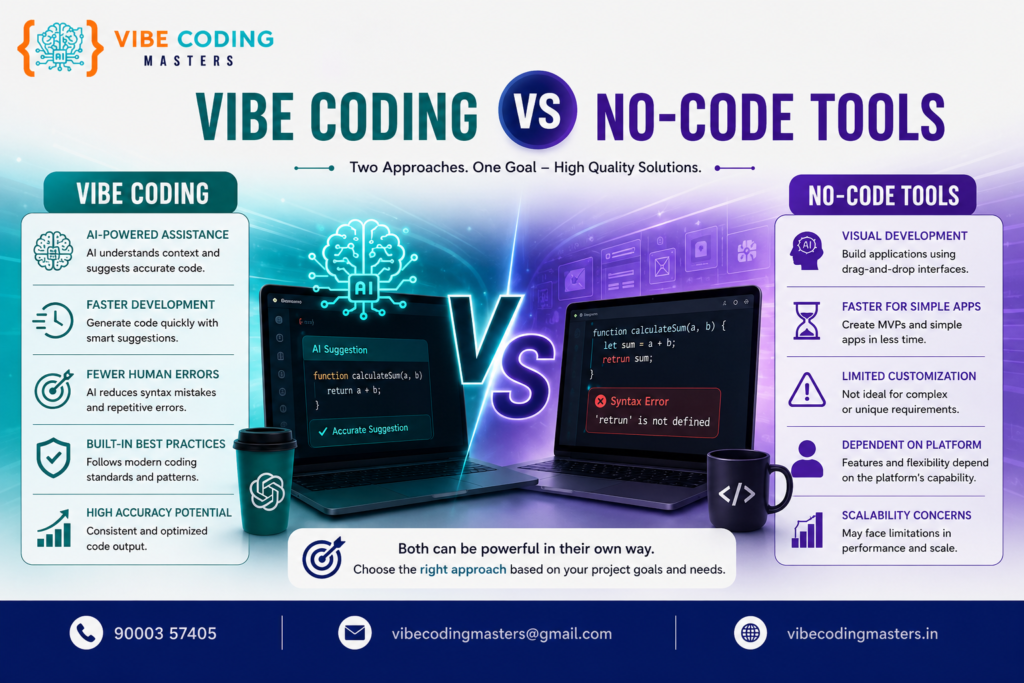
The core difference in the vibe coding vs no-code tools debate is how the application is actually built and what you’re left with afterward.
- Vibe coding produces real source code you can read, edit, export, and deploy anywhere.
- No-code tools produce an application that lives inside the platform’s own ecosystem, often with limited or no exportable code.
- Vibe coding requires at least a working understanding of how software is structured, even if AI writes the syntax.
- No-code tools require no programming understanding at all — just logical thinking and familiarity with the platform’s interface.
- Vibe coding generally offers deeper customization and scalability for complex products.
- No-code tools generally offer faster setup for simple, well-defined use cases.
Vibe Coding vs No-Code Tools: Which Is Better?
Neither is universally “better” — the right choice depends on the project’s complexity, the builder’s technical background, and long-term goals.
- Choose vibe coding if you need a custom product, plan to scale, want full ownership of the code, or are building something that doesn’t fit neatly into a template.
- Choose no-code tools if you need something simple and fast — an internal dashboard, a landing page, a basic workflow automation — and don’t need deep customization.
Many teams today actually use both: no-code for quick internal tools and vibe coding for customer-facing products that need to grow.
How Vibe Coding Works
- Describe the goal — You explain what you want built, in natural language (e.g., “Build a to-do app with user login and a Postgres database”).
- AI generates code — The coding assistant produces frontend components, backend logic, and sometimes database schemas.
- Preview and test — Most tools show a live preview so you can immediately see the result.
- Iterate through prompts — You ask for changes (“make the button blue,” “add a delete function”) instead of editing code directly, though you can edit manually too.
- Debug with AI help — When something breaks, you describe the issue and the assistant helps diagnose and fix it.
- Connect real infrastructure — APIs, databases, authentication, and cloud deployment get wired in, often through integrated tools or manual configuration.
- Deploy — The finished app is pushed to a hosting platform, just like traditionally coded software.
Wondering if this process actually holds up for a real project? We’ve broken it down separately in can you build a website with vibe coding.
How No-Code Development Works
- Choose a template or start blank — Most platforms offer templates for common app types.
- Design the interface visually — Drag components like buttons, forms, and lists onto the page.
- Define data structures — Set up your data model using built-in database tools (no SQL required).
- Build logic with visual workflows — Create automation using if-this-then-that style logic blocks.
- Connect integrations — Link to third-party services like payment gateways or email tools using built-in connectors.
- Preview and publish — Test the app inside the platform and publish with one click.
Advantages of Vibe Coding
- Produces real, portable, exportable code
- Greater flexibility for complex or unique features
- Easier to scale as the product grows
- Works well alongside traditional development workflows (Git, APIs, cloud deployment)
- Speeds up prototyping without sacrificing long-term extensibility
- Useful for developers who want to move faster, not just non-coders
Advantages of No-Code Tools
- No programming knowledge required at all
- Extremely fast setup for simple applications
- Lower learning curve for non-technical users
- Often includes built-in hosting, so there’s less infrastructure to manage
- Great for validating an idea before investing in custom development
- Strong for internal tools, workflow automation, and small business websites
Limitations of Vibe Coding
- Still requires some understanding of code structure to debug effectively
- AI-generated code can contain errors, security issues, or inefficiencies that need review
- Quality depends heavily on how well the user writes prompts
- May need a developer’s oversight for production-grade, high-stakes applications
Limitations of No-Code Tools
- Limited customization beyond what the platform allows
- Can face scalability issues as user base or complexity grows
- Risk of vendor lock-in since apps often can’t be exported as standalone code
- May become costly at scale due to subscription-based pricing tiers
- Complex, highly specific business logic can be hard or impossible to implement
Vibe Coding vs No-Code Tools for Beginners
For someone brand new to building software, no-code tools have traditionally had a gentler learning curve since there’s no code to understand at all — just logical, visual thinking. However, vibe coding has become far more beginner-friendly than it used to be, since you can describe what you want in plain English and let AI handle the technical execution. Beginners who eventually want to understand real programming may benefit more from vibe coding, since it exposes them to actual code as they go. If you’re a complete beginner weighing your options, our dedicated guide on vibe coding for non-programmers walks through this decision in more depth.
Vibe Coding vs No-Code Tools for Developers
Developers generally lean toward vibe coding because it keeps them working with real code, frameworks, and tools they already know — Git, APIs, databases, cloud deployment — while dramatically speeding up repetitive or boilerplate work. No-code tools can feel restrictive to experienced developers since they limit control over the underlying architecture.
Vibe Coding vs No-Code Tools for Businesses and Startups
Startups often start with no-code tools to validate an idea cheaply and quickly, then transition to vibe coding or traditional development once the product needs custom features, better performance, or the ability to scale to more users. Businesses building customer-facing, revenue-generating products tend to favor vibe coding for the flexibility and code ownership it provides.
Vibe Coding vs No-Code Tools for Career Growth
Vibe coding skills are increasingly valued because they combine AI fluency with a foundational understanding of software development — a combination many companies are actively hiring for. No-code skills are valuable for roles focused on automation, operations, and rapid internal tool-building, but tend to have a narrower ceiling for advancement into core engineering roles. That said, both skill sets are complementary, and professionals with experience in both are well-positioned for hybrid AI-development roles.
A recognized vibe coding certification can also strengthen your profile if you’re job-hunting. And if you’re deciding between this path and a traditional bootcamp-style program, our comparison of vibe coding vs a full-stack developer course can help you weigh the two. Already working and considering a switch? Our vibe coding course for working professionals is built specifically for that transition.
Skills Required for Vibe Coding
While vibe coding lowers the barrier to entry, a few foundational skills make a real difference in output quality
- Prompt engineering — the ability to describe requirements clearly and precisely to get accurate AI-generated code (see our collection of vibe coding prompts for practical examples)
- Basic understanding of programming logic — variables, functions, loops, and conditionals
- Familiarity with frontend development — HTML, CSS, and JavaScript/TypeScript basics, especially frameworks like React
- Basic backend knowledge — how servers, APIs, and databases interact
- Debugging skills — reading error messages and working with the AI to resolve them
- Git and GitHub — for version control and collaboration
- Cloud deployment basics — understanding how to publish an app so others can use it
Popular Tools for Vibe Coding
Some widely used AI-assisted coding tools and platforms in this space include Claude (via Claude Code and Claude in various IDEs), Cursor, GitHub Copilot, Replit’s AI Agent, Lovable, Bolt, and v0 by Vercel. These tools vary in focus — some specialize in full-stack app generation, others in coding assistance within existing IDEs — but they share the same core idea: turning natural-language prompts into working code. For a more detailed breakdown of each option, see our full roundup of vibe coding platforms.
Popular No-Code Tools
For the AI-native coding side of this comparison, see our full roundup of vibe coding platforms.
Vibe Coding Career Opportunities
Vibe coding is opening roles such as AI-assisted developer, rapid prototyping engineer, AI product builder, and freelance app developer using AI tools. Companies are increasingly looking for people who can combine traditional development fundamentals with fluency in AI coding assistants to ship products faster. We cover this in much more depth in our dedicated post on career opportunities after vibe coding.
No-Code Career Opportunities
No-code skills support roles like no-code developer, automation specialist, Bubble/Webflow developer, and operations/RevOps professionals who build internal tools without needing an engineering team. Freelance no-code development is also a growing niche, especially for small business websites and simple SaaS MVPs.
Vibe Coding Salary and Career Scope
Vibe coding is still an emerging skill category, so compensation is often tied to broader roles like “AI-assisted developer” or “full-stack developer with AI tooling experience” rather than a standalone job title. In India, professionals who combine coding fundamentals with AI tool proficiency are increasingly favored for faster-paced development roles, though actual salaries vary significantly by company size, location, experience, and the complexity of projects handled. If you’re just starting out, our dedicated breakdown of vibe coding developer salary for freshers in India covers entry-level numbers in more detail.
Vibe Coding vs No-Code Tools: Future Scope
Both fields are expected to keep growing as AI tools mature and no-code platforms add more advanced capabilities. AI coding assistants are becoming more capable of handling complex, multi-file projects, while no-code platforms are increasingly integrating AI features of their own — blurring the line between the two categories over time. The long-term trend points toward a spectrum of tools rather than a strict either/or choice, with businesses picking the right approach based on the specific project rather than committing to one philosophy permanently.
How to Start Learning Vibe Coding
Getting started with either path follows the same core loop: pick one AI tool, describe a small project in plain English, and learn the fundamentals as you build. For the full stage-by-stage roadmap — tools, languages, and projects for each level — see our complete Vibe Coding Roadmap.
If you’d rather learn this in a structured, mentor-led format, our vibe coding course in Hyderabad covers this entire path with hands-on projects and placement support.
Explaining Key Technologies and Concepts
Understanding vibe coding and no-code development gets easier once a few core technologies are clear
- Generative AI refers to AI systems that can create new content — including code — based on prompts. It’s the underlying technology that powers vibe coding.
- Large Language Models (LLMs) are the AI models trained on massive amounts of text and code that understand and generate natural language and programming languages. They’re the “brains” behind AI coding assistants.
- Prompt Engineering is the skill of writing clear, effective instructions to get accurate, useful output from an AI model — critical for successful vibe coding.
- AI Coding Assistants are tools (like the ones listed above) that use LLMs to generate, explain, or fix code based on user prompts.
- Code Generation is the process by which AI produces working source code from a natural-language description.
- Debugging is the process of identifying and fixing errors in code — a skill still needed in vibe coding, even with AI assistance.
- APIs (Application Programming Interfaces) allow different software systems to communicate — both vibe-coded and no-code apps rely on APIs to connect to external services.
- Databases store and organize an application’s data — common choices include MongoDB and PostgreSQL — and both vibe-coded and no-code apps need some form of database, whether built manually or through a no-code platform’s built-in system.
- Git and GitHub are tools for version control (see the official Git documentation and GitHub), letting developers track changes and collaborate on code — essential for vibe coding, not applicable to no-code platforms.
- Frontend development refers to building what users see and interact with — the interface of an app.
- Backend development refers to the server-side logic, databases, and infrastructure that power an app behind the scenes.
- JavaScript/TypeScript are the primary programming languages of the web (see MDN’s JavaScript documentation for the official reference), commonly generated by AI coding tools.
- Python is a widely used programming language known for readability (the official Python site has documentation and downloads), often used in backend and AI-related projects.
- React is a popular JavaScript framework for building user interfaces (see the official React documentation), frequently used in AI-generated frontend code.
- Node.js is a runtime environment that lets JavaScript run on servers (details on the official Node.js site), commonly used for backend logic in vibe-coded apps.
- Cloud deployment means publishing an app to a hosting service so it’s accessible over the internet.
- Automation refers to using software (often no-code workflow tools) to perform repetitive tasks without manual effort.
- Workflow builders are visual tools within no-code platforms used to define logic and automation steps.
- Visual development is the broader practice of building software through graphical interfaces instead of writing code — the foundation of no-code tools.
- SaaS applications (Software-as-a-Service) are cloud-hosted apps delivered over the internet, a common end goal for both vibe-coded and no-code-built products.
Comparison Table: Vibe Coding vs No-Code Tools
Factor | Vibe Coding | No-Code Tools |
Coding Knowledge | Helpful, not always mandatory | Not required |
Ease of Learning | Moderate — depends on prompt skills and basic logic | Easy, especially for non-technical users |
Development Speed | Fast, especially for prototypes | Very fast for simple apps |
Customization | High — real code can be edited freely | Limited to platform’s features |
Flexibility | High | Moderate to low |
Scalability | Generally strong, especially with proper architecture | Can be limited at scale |
Debugging | Requires reviewing AI-generated code | Handled mostly by the platform |
AI Usage | Core to the entire process | Sometimes present as an added feature |
Cost | Varies — tool subscriptions plus hosting/infra costs | Often subscription-based, can rise with usage |
Best For | Custom apps, startups, developers, scalable products | Simple apps, MVPs, internal tools, non-programmers |
Career Opportunities | AI-assisted developer roles, freelancing, startups | No-code developer, automation specialist roles |
Long-Term Development | Strong, since code is portable and extensible | Can face constraints tied to the platform |
Additional Comparisons
Vibe Coding vs Traditional Coding
Traditional coding involves manually writing every line of code and building applications from the ground up without AI generation, while vibe coding compresses much of that manual work by having AI generate the code from natural-language prompts as the developer reviews and refines it. Traditional coding still wins out for highly specialized, performance-critical, or security-sensitive systems. For a full side-by-side breakdown, read vibe coding vs traditional coding.
Vibe Coding vs Low-Code Development
Low-code platforms sit between no-code and traditional development — they provide visual building blocks but also allow some manual coding for custom logic. Vibe coding differs because the “building blocks” are generated entirely by AI based on prompts, rather than pre-built visual components you assemble yourself. Low-code is a good fit for teams that want speed with occasional custom logic; vibe coding is better for teams that want AI to handle most of the code generation from the start.
Vibe Coding vs No-Code Development
This is the central comparison of this guide: vibe coding generates real, exportable code through AI prompts, while no-code development uses visual builders with no code involved at all. Vibe coding suits users who want flexibility and long-term scalability; no-code suits users who want the fastest possible path to a working app without any technical learning curve.
Career and Salary Snapshot (India)
Fresher pay for AI-assisted roles in India currently runs roughly ₹3.5–8 LPA, rising sharply with real, deployed projects rather than years on paper. For the full experience-wise salary breakdown and city comparisons, see Vibe Coding Developer Salary for Freshers in India.
Career Roadmap
For the stage-by-stage skill roadmap, see our Vibe Coding Roadmap.
Market Demand and Trends
AI-assisted software development has grown rapidly as coding assistants have become more capable of handling multi-step, multi-file projects rather than just single functions. More developers are incorporating generative AI into their daily workflows to speed up repetitive coding tasks, debugging, and prototyping. At the same time, no-code and low-code platforms continue to expand their feature sets, increasingly adding their own AI capabilities to compete for the same “build faster” audience.
There’s growing demand for developers who are comfortable working alongside AI tools rather than purely by hand — a skill set that spans startups looking to ship quickly and larger companies aiming to boost engineering productivity. Startups in particular have embraced both no-code tools (for early validation) and vibe coding (for scaling custom products) as a way to move from idea to market faster than traditional development timelines allow.
India’s technology sector, home to a large developer workforce and a fast-growing startup ecosystem, is increasingly reflecting these global trends — with more roles referencing AI tooling experience and rapid application development as valued skills. As generative AI models continue to improve, demand for professionals who can effectively direct, review, and refine AI-generated code is expected to keep growing alongside more traditional software development roles.
Why Vibe Coding Is Becoming a Major IT Career Trend
Vibe coding is gaining traction as a career-relevant skill for several concrete reason
Vibe coding is growing fast because it lowers the barrier to entry while making experienced developers dramatically faster — a combination that’s fueling demand across startups, freelancing, and enterprise teams alike in India. For the full breakdown of demand drivers and hiring trends, see our Vibe Coding Roadmap.
Key Takeaways
- Vibe coding uses AI to generate real, editable code from natural-language prompts, while no-code tools rely entirely on visual, drag-and-drop building with no code produced.
- Vibe coding generally offers more customization and scalability; no-code tools offer faster, simpler setup for straightforward projects.
- Beginners and non-technical users often start with no-code tools, while developers and growing businesses tend to favor vibe coding for flexibility.
- Both fields are creating new career opportunities in India’s tech sector, though actual salaries and outcomes vary by skills, experience, and role.
- The future likely favors a blend of both approaches, as AI-assisted development and no-code platforms continue to evolve and overlap.
Conclusion
When it comes to vibe coding vs no-code tools, the real answer isn’t about which one is “better” overall — it’s about which one fits your project and your goals. Vibe coding gives you real, exportable code, deeper customization, and stronger long-term scalability, making it a strong choice for developers, startups, and businesses building products that need to grow and evolve. No-code tools remain an excellent choice when speed and simplicity matter most, especially for non-programmers building internal tools, simple websites, or quick MVPs without any coding background.
As AI-assisted development continues to mature, the line between vibe coding and no-code tools is likely to blur further, with both approaches borrowing strengths from each other. Whichever path fits your current stage, starting with the fundamentals — a bit of programming logic, some hands-on practice with an AI coding tool, and a willingness to iterate — will set you up well for what’s shaping up to be one of the most significant shifts in how software gets built. If you’re in Hyderabad and want to skip the trial-and-error and learn this hands-on with mentor support, explore our vibe coding course in Hyderabad and take the first step today.
FAQ
- What is the difference between vibe coding and no-code tools?
Vibe coding uses AI to generate real, editable source code from natural-language prompts, while no-code tools let you build apps visually through drag-and-drop interfaces with no code produced at all.
- Is vibe coding better than no-code?
Neither is universally better — vibe coding offers more flexibility and scalability for custom projects, while no-code tools offer faster, simpler builds for straightforward apps and non-technical users.
- Is vibe coding suitable for beginners?
Yes, vibe coding can work well for beginners since AI handles most of the syntax, though having a basic understanding of programming logic helps you get better results and debug issues.
- Do you need coding knowledge for vibe coding?
Not strictly, but a basic understanding of how frontend, backend, and databases work makes it much easier to guide the AI and fix problems when they arise.
- Are no-code tools better for non-programmers?
Yes, no-code tools are specifically designed for non-programmers, requiring no coding knowledge and offering a fully visual building experience.
- Can vibe coding replace traditional coding?
Vibe coding can speed up and simplify much of the coding process, but traditional coding skills remain important for complex, performance-critical, or highly specialized systems.
- Which is better for building startups: vibe coding or no-code?
It depends on the stage — no-code is often used for early idea validation, while vibe coding tends to be preferred once a startup needs more customization and scalability.
- Is vibe coding a good career in India?
Vibe coding-related skills are increasingly valued in India’s growing tech sector, particularly for roles combining AI tool fluency with development fundamentals, though outcomes vary by individual skill and experience.
- What are the best vibe coding tools?
Popular AI-assisted coding tools include Claude, Cursor, GitHub Copilot, Replit’s AI Agent, Lovable, Bolt, and v0 by Vercel, each with different strengths for app generation and coding assistance.
- Will vibe coding replace software developers?
Vibe coding is more likely to change how developers work than replace them entirely, shifting their role toward guiding, reviewing, and refining AI-generated code rather than writing every line manually.