ChatGPT vs Cursor for Coding: A Practical Comparison for Developers
ChatGPT is a conversational AI best for learning, explaining code, and generating standalone snippets, while Cursor is a full AI-native code editor built for working inside real, multi-file codebases. Beginners and learners often start with ChatGPT; developers building and maintaining production projects usually gain more from Cursor’s project-aware editing. Many developers end up using both together rather than choosing just one.
★★★★★
4.9/5 rated by 1329+ students · Google Verified
Table of Contents
Introduction
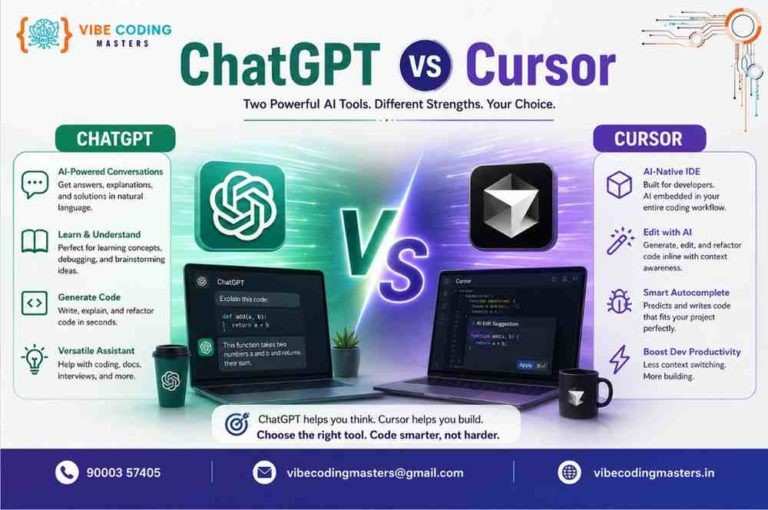
If you’ve searched for chatgpt vs cursor for coding, you’re probably trying to decide which AI tool actually fits how you build software — not just which one has the flashier demo. Both tools have become part of the everyday toolkit for millions of developers, but they solve different problems, and picking the wrong one for your workflow can slow you down instead of speeding you up.
ChatGPT started as a general-purpose conversational AI and has grown into a serious coding companion, especially with OpenAI’s Codex now built into the ChatGPT app, CLI, and IDE integrations. It’s the tool most people reach for first because it’s flexible, easy to open in a browser, and good at explaining things in plain language. Cursor, on the other hand, was built from day one as an AI-native code editor — a fork of VS Code with AI woven into every part of the workflow, from autocomplete to multi-file refactors.
As AI-assisted development becomes the default rather than the exception, the choice between these two tools (or how to combine them) has real consequences for learning speed, project quality, and career growth. This is especially true for developers in India, where demand for AI-literate engineers is rising across web development, full-stack roles, and freelance work. This guide breaks down what each tool does well, where each one falls short, and how to decide — or combine both — based on your actual coding needs.
ChatGPT vs Cursor
What is ChatGPT for Coding?
ChatGPT is a general-purpose conversational AI from OpenAI that developers use as a coding assistant through chat, and increasingly through Codex, OpenAI’s dedicated coding agent that now lives inside the ChatGPT web app, a desktop app, a CLI, and various IDE integrations. Used this way, ChatGPT supports a wide range of coding tasks
- Writing functions, classes, and complete small programs from natural-language prompts
- Explaining programming concepts, syntax, and language features
- Debugging by pasting in error messages or stack traces
- Refactoring existing code for readability or performance
- Generating REST API endpoints and boilerplate
- Writing and optimizing SQL queries
- Creating unit and integration test cases
- Teaching programming languages step by step
- Interpreting confusing error messages in plain English
- Generating docstrings, README files, and technical documentation
- Brainstorming architecture and implementation approaches before writing code
Advantages: ChatGPT is flexible, works for almost any language or framework, is excellent at teaching and explaining, and doesn’t require you to change your editor or workflow. With Codex integrated, it can now also act as an agent that plans and executes multi-step coding tasks, review pull requests, and work against a connected repository.
Limitations: In its classic chat interface, ChatGPT has no automatic awareness of your actual project files unless you paste code in or explicitly connect a repository through Codex. Long conversations can lose context, and copy-pasting code between chat and your editor adds friction compared to an AI that lives inside the editor itself.
What is Cursor for Coding?
Cursor is an AI-native code editor built on a fork of Visual Studio Code, made by Anysphere. Unlike a traditional editor with an AI plugin bolted on, Cursor is designed around AI from the ground up. Key capabilities include
- AI-assisted code generation directly inside files
- Codebase-wide understanding, so it can answer questions about your actual project
- Context-aware suggestions based on the files you’re currently working in
- Agent mode that can plan and execute multi-file changes
- Debugging assistance tied to your real error output and terminal
- Fast, predictive code completion (“Tab”) as you type
- Native support for editing across multiple files in one request
- Project-level context that spans your whole repository, not just the open tab
- Refactoring tools that understand dependencies across files
- A workflow that fits directly into how developers already use VS Code-style editors, including extensions and keybindings
Because Cursor keeps a working model of your entire codebase, it’s particularly useful on real-world projects where changes ripple across multiple files — updating a shared component, renaming a function when working across multiple parts of an application or tracking down issues that span several layers. Cursor routes requests to frontier models such as Claude, GPT, Gemini, and others depending on the task and plan, rather than running a single in-house model. If you want a broader picture of where Cursor fits among other AI coding tools used for vibe coding, it’s worth comparing setups before committing to one.
ChatGPT vs Cursor for Coding: What Is the Difference?
The core difference in the chatgpt vs cursor for coding debate comes down to this: ChatGPT is a conversational assistant you consult, while Cursor is an editor you live inside.
- Primary purpose: ChatGPT is built for conversation and general problem-solving; Cursor is built specifically for writing and editing code inside a project.
- Coding workflow: ChatGPT typically involves prompting, then copying code into your editor (unless you’re using Codex against a connected repo). Cursor generates and edits code in place.
- Code generation: Both can generate functions, components, and boilerplate; Cursor applies changes directly to your files.
- Code completion: Cursor offers fast, inline Tab completion as you type; ChatGPT’s completions happen in a separate chat window.
- Codebase awareness: Cursor indexes your whole project by default; ChatGPT needs code pasted in, or a repository explicitly connected through Codex.
- Debugging: Both can debug from error messages, but Cursor can trace an error to the actual failing file and surrounding context automatically.
- Refactoring: Cursor handles multi-file refactors more naturally since it can edit several files in one operation.
- Context handling: Cursor persists project context across a session; ChatGPT’s context depends on what’s in the current conversation.
- IDE/editor integration: Cursor is the editor. ChatGPT integrates with editors mainly through Codex extensions or manual copy-paste.
- Project development: Cursor is oriented toward ongoing, real projects; ChatGPT is strong for standalone tasks and learning.
- Learning: ChatGPT’s conversational format is generally easier for step-by-step learning and concept explanation.
- Productivity: For established codebases, Cursor tends to reduce context-switching; for exploratory or conceptual work, ChatGPT is often faster.
- Ease of use: ChatGPT requires no setup — open a browser tab and start typing. Cursor requires installing and adopting a new editor.
- Best use cases: ChatGPT for learning, explanations, and one-off snippets; Cursor for building and maintaining real applications.
ChatGPT vs Cursor for Coding: Which Is Better?
There’s no single answer to which is better for coding — ChatGPT or Cursor — because they’re optimized for different stages of the developer journey.
- Beginners and students often benefit more from ChatGPT’s conversational explanations while they’re still learning fundamentals.
- Freelancers frequently use both: ChatGPT for scoping and explaining client requirements, Cursor for delivering the actual project.
- Web developers and full-stack developers working across many files tend to prefer Cursor’s project-aware editing once they’re past the learning stage.
- Backend developers dealing with APIs, databases, and services often value Cursor’s ability to trace logic across multiple files.
- Frontend developers iterating quickly on UI components benefit from Cursor’s in-editor completions and ChatGPT’s ability to explain design patterns.
- Experienced developers typically use Cursor as their daily driver and keep ChatGPT open for architecture discussions or explaining unfamiliar tech.
- Development teams managing larger codebases usually get more consistent value from Cursor’s shared project context, alongside ChatGPT for documentation and planning.
Avoid treating either tool as a silver bullet — both still require developer judgment to verify correctness, security, and maintainability of the code they produce.
ChatGPT vs Cursor: Feature Comparison
Feature | ChatGPT | Cursor |
AI coding assistance | Yes, conversational + Codex agent | Yes, built into the editor |
Code generation | Strong, especially for standalone snippets | Strong, applied directly to project files |
Code explanation | Excellent, plain-language teaching style | Good, contextual to the code you’re viewing |
Debugging | Strong when errors are pasted in | Strong with direct access to terminal/output |
Code completion | Limited outside Codex integrations | Fast, inline Tab completion |
Project context | Requires manual input or Codex repo connection | Automatic, whole-codebase indexing |
Multi-file editing | Possible via Codex agent | Core strength, native support |
Refactoring | Good for isolated code | Strong across multiple related files |
IDE integration | Via extensions/Codex CLI | Native — Cursor is the IDE |
Learning support | Excellent for concepts and fundamentals | Good, but more workflow-oriented |
Documentation | Strong at generating docs and READMEs | Good, generated in context of real files |
Large codebases | Limited without explicit context | Well suited, indexes the full repo |
Developer productivity | High for planning, learning, one-off tasks | High for day-to-day building and maintenance |
Beginner friendliness | Very high | Moderate — assumes editor familiarity |
ChatGPT vs Cursor for Different Programming Tasks
- Learning programming: ChatGPT’s step-by-step explanations are usually easier to follow for newcomers.
- Building websites: Cursor helps you build and iterate directly in your project files; ChatGPT is useful for planning the structure first.
- Frontend development: Cursor’s live completions speed up component work; ChatGPT is handy for explaining CSS or framework behavior.
- Backend development: Cursor’s cross-file awareness helps trace service and API logic; ChatGPT is good for designing endpoints conceptually.
- Full-stack development: Both matter — ChatGPT for architecture conversations, Cursor for implementation across the stack.
- API development: ChatGPT can draft endpoint logic quickly; Cursor keeps it consistent with your existing API structure.
- Debugging: Cursor’s terminal and file access make root-causing errors faster; ChatGPT is strong when you can clearly describe the problem.
- Refactoring: Cursor is generally the stronger option for changes spanning multiple files.
- Writing tests: Both can generate test cases; Cursor can align them with your actual test suite structure.
- SQL development: ChatGPT is convenient for writing and explaining queries outside a project context.
- Git/GitHub workflows: Codex-enabled ChatGPT can work with connected repositories and pull requests; Cursor integrates with Git inside the editor.
- Documentation: ChatGPT is often faster for generating clear, standalone documentation.
- Large application development: Cursor’s project-wide context is the bigger advantage here.
- Rapid prototyping: Both work well; ChatGPT for quick throwaway scripts, Cursor for prototypes you intend to keep building on.
ChatGPT vs Cursor for Beginners
For someone learning to code from scratch, the conversational format of ChatGPT is generally easier to start with. It explains programming concepts in plain language, breaks down confusing error messages, and lets learners ask “why” repeatedly without needing to understand editor setup or project structure first.
As beginners move from tutorials to small personal projects, many start introducing Cursor to get used to working inside a real editor with AI-assisted completions and project context. This transition — from learning concepts in a chat window to building inside a project-aware editor — mirrors how many developers naturally grow into using both tools.
ChatGPT vs Cursor for Professional Developers
Experienced developers tend to use both tools for different parts of their day. Cursor typically becomes the primary environment for working inside an existing codebase: refactoring, debugging live issues, and building new features with awareness of surrounding code. ChatGPT remains useful for code reviews conducted outside the editor, thinking through architecture decisions, drafting technical documentation, and solving problems that benefit from a broader conversational back-and-forth rather than direct file edits. The combination — Cursor for hands-on implementation, ChatGPT for planning and reasoning — is a common pattern among professional teams.
ChatGPT vs Cursor for Full-Stack Development
Full-stack developers working across HTML, CSS, JavaScript, TypeScript, React, Next.js, Node.js, Python, .NET, ASP.NET Core, APIs, and SQL databases can find value in both tools, applied differently
- ChatGPT is useful when you need to understand a new framework quickly, get a conceptual explanation of how a piece of the stack fits together, or draft a standalone script or query outside your main project.
- Cursor provides a bigger workflow advantage once you’re actively building — it can see your frontend and backend files together, keep API contracts consistent across the stack, and apply changes across multiple layers of the application in one pass.
ChatGPT vs Cursor for AI-Assisted Coding
AI-assisted programming is reshaping how software gets built, shifting more work toward prompt-based development, natural-language-driven code generation, and AI-assisted debugging. Both ChatGPT and Cursor sit inside this shift, but from different angles: ChatGPT (through Codex) increasingly behaves like an autonomous coding agent capable of planning and executing multi-step tasks, while Cursor embeds those same agentic capabilities directly into the editing experience.
Regardless of which tool is used, the fundamentals of AI-assisted coding stay the same: rapid prototyping speeds up early-stage development, but human review of AI-generated code remains essential. Understanding what the generated code actually does — not just accepting it — is still the developer’s responsibility.
ChatGPT vs Cursor: Advantages and Limitations
Advantages of ChatGPT
- Extremely flexible for learning, explaining, and brainstorming
- No editor switch required to get started
- Codex integration adds real agentic coding and repository-aware capability
- Strong at producing documentation and clear explanations
Limitations of ChatGPT
- Classic chat mode lacks automatic project-wide context
- Copy-pasting between chat and editor adds friction in non-Codex workflows
- Long conversations can lose earlier context
Advantages of Cursor
- Deep, automatic understanding of your actual codebase
- Fast inline completions that fit naturally into typing
- Strong multi-file editing and refactoring
- Familiar VS Code-based interface for existing developers
Limitations of Cursor
- Requires switching editors if you’re not already on a VS Code-based setup
- Pricing is usage-based through a credit system, which can make costs less predictable than a flat subscription
- Less naturally suited to open-ended conceptual learning than a chat interface
ChatGPT vs Cursor Pricing and Plans
Pricing for both tools changes fairly often, so treat any numbers here as a snapshot rather than a permanent reference — always check the official ChatGPT and Cursor pricing pages before subscribing.
As of 2026, Cursor uses a tiered, credit-based pricing model rather than a single flat fee, as detailed on Cursor’s official pricing page. It generally spans a free Hobby tier, a Pro tier around $20/month, higher individual tiers, and a Teams tier priced per user, with a credit pool that gets consumed faster when you manually pick premium frontier models instead of using Cursor’s automatic model-selection mode. ChatGPT similarly offers a free tier alongside paid Plus, Pro, and business plans — see OpenAI’s official ChatGPT Plus page — with Codex access and usage limits varying by plan. Because both companies adjust limits, credits, and included models frequently, the safest approach is to check current plan details directly on OpenAI’s and Cursor’s official sites before deciding.
ChatGPT vs Cursor for Coding Productivity
Used well, both tools can meaningfully speed up development: faster first drafts of code, quicker debugging cycles, easier exploration of unfamiliar codebases, faster prototyping, less time spent writing repetitive boilerplate, and quicker documentation. Independent developer surveys have found measurable time savings from daily AI tool use, though the exact numbers vary by study and role.
That said, AI tools work best as an assistant to technical judgment, not a replacement for it. Studies have also found a persistent trust gap — many developers use AI-generated code daily but still review it carefully before shipping, which is a healthy pattern to keep regardless of which tool you choose.
Can ChatGPT and Cursor Be Used Together?
Yes — many developers combine both tools rather than picking one exclusively. A practical workflow looks like this
- Use ChatGPT to understand a technical requirement or unfamiliar concept.
- Sketch an implementation approach and talk through trade-offs conversationally.
- Switch to Cursor to implement the changes directly inside the actual project.
- Use Cursor’s in-editor AI to debug and refactor as you go.
- Go back to ChatGPT for explanations, documentation drafts, or architectural discussions that don’t need direct file access.
- Review and test the final code manually before committing.
This combination plays to each tool’s strengths: ChatGPT for reasoning and explanation, Cursor for grounded, in-project execution.
Best AI Coding Tools for Developers in 2026
Beyond ChatGPT and Cursor, the AI coding ecosystem in 2026 includes tools like GitHub Copilot (see GitHub’s official Copilot page for its current feature set), deeply integrated into GitHub and popular for its low entry price, Claude Code (a command-line and agentic coding tool known for strong developer trust scores in industry surveys), and various IDE-native AI assistants from JetBrains and other vendors. ChatGPT and Cursor sit at two different ends of this ecosystem — one general-purpose and conversational, the other editor-native and project-aware — which is exactly why so many developers reach for both rather than treating the choice as either/or.
Skills Developers Need in the AI Coding Era
AI tools accelerate output, but they don’t replace the fundamentals that make that output trustworthy. A clear learning roadmap helps here — developers still need solid grounding in
- Programming fundamentals and language basics
- Data structures and algorithms
- Database design and query optimization
- API design principles
- Git and version control workflows
- Manual debugging skills, for when AI suggestions are wrong
- Software architecture and system design
- Testing practices
- Security awareness, including reviewing AI-generated code for vulnerabilities
- Prompt engineering, to get better results from AI tools
- General AI-assisted development literacy
- Code review skills, since AI-generated code still needs human sign-off
AI Coding and Career Opportunities in India
AI-assisted development is increasingly shaping hiring expectations for software roles in India, across web development, full-stack engineering, backend and frontend specializations, automation, SaaS product teams, freelancing, and startup environments. Developers comfortable using tools like ChatGPT and Cursor alongside strong fundamentals are generally better positioned to work faster and take on more ambitious projects — and to explore the career opportunities and salary ranges that come with AI-assisted development skills. At the same time, employers continue to prioritize genuine problem-solving ability and technical depth — AI fluency is becoming a valuable addition to a developer’s skill set, not a substitute for it.
Why AI-Assisted Coding Is Becoming Important for Developers
The broader shift toward AI-assisted software development is being driven by faster prototyping cycles, real (if uneven) productivity gains, reduced time spent on repetitive coding tasks, faster debugging through AI-assisted error analysis, easier exploration of unfamiliar codebases, and quicker paths from idea to working application. Developer surveys from Stack Overflow, JetBrains, and DORA have all tracked rising adoption of AI coding tools year over year, with a growing share of professional developers now using some form of AI assistance daily. This trend shows no sign of slowing, which is exactly why understanding tools like ChatGPT and Cursor — and how they differ — matters for anyone building a career in software.
ChatGPT vs Cursor Comparison Table
Category | ChatGPT | Cursor |
Learning | Strong | Moderate |
Code generation | Strong | Strong |
Debugging | Strong (with pasted errors) | Strong (with direct access) |
Code completion | Limited outside Codex | Strong, inline |
Project context | Manual / Codex-dependent | Automatic |
Multi-file development | Via Codex agent | Core strength |
Refactoring | Good | Strong |
IDE workflow | Add-on / Codex CLI | Native |
Large codebases | Limited | Well suited |
Documentation | Strong | Good |
Prototyping | Strong | Strong |
Beginner friendliness | Very high | Moderate |
Professional development | High (planning/reasoning) | High (implementation) |
Productivity | High for one-off tasks | High for ongoing projects |
Best suited for | Learning, explaining, planning | Building, maintaining real projects |
ChatGPT vs Cursor Use-Case Table
Use Case | Better Fit |
Learning to code | ChatGPT |
Understanding concepts | ChatGPT |
Debugging errors | Both |
Writing small programs | ChatGPT |
Building websites | Cursor |
Building APIs | Both |
Full-stack applications | Cursor |
Working with existing codebases | Cursor |
Refactoring | Cursor |
Writing tests | Both |
Documentation | ChatGPT |
Large projects | Cursor |
Rapid prototyping | Both |
Career and Skill Comparison
- Frontend Developer: ChatGPT for explaining framework behavior; Cursor for fast, in-context component work.
- Backend Developer: Cursor for tracing logic across services; ChatGPT for reasoning through system design.
- Full-Stack Developer: Benefits from combining both — planning in ChatGPT, building in Cursor.
- Software Engineer: Uses Cursor day-to-day, ChatGPT for architecture and documentation.
- Web Developer: Cursor for project work, ChatGPT for learning new tools and frameworks.
- AI-Assisted Developer: Increasingly fluent in both, using each where it fits rather than defaulting to one.
Across all these roles, the common thread is avoiding over-dependence on AI output — treating both tools as accelerators for developer judgment, not replacements for it.
Statistics, Trends, and Market Insights
- Stack Overflow’s 2025 Developer Survey found that 84% of developers use or plan to use AI tools in development, with 51% of professional developers using AI tools daily.
- JetBrains’ State of Developer Ecosystem 2025 reported that 85% of developers regularly use AI tools for coding, with 62% relying on at least one dedicated AI coding assistant.
- A JetBrains follow-up survey in early 2026 found adoption climbing further, with 90% of developers regularly using at least one AI tool at work and 74% using a specialized coding tool beyond general chatbots.
- GitHub reported that Copilot crossed 4.7 million paid subscribers as of January 2026, up 75% year over year.
- Anysphere, the company behind Cursor, reportedly surpassed $2 billion in annualized revenue with over a million paying subscribers by February 2026, according to industry reporting.
- OpenAI’s Codex reportedly grew to more than 2 million weekly active users by March 2026, expanding beyond pure coding into broader enterprise agent use cases.
- Despite high adoption, trust remains a gap: multiple 2025–2026 surveys report that fewer than a third of developers fully trust AI-generated code without review, underscoring the continued need for human oversight.
These figures come from third-party developer surveys and industry reporting current as of 2026; check the original sources for the latest numbers, since adoption and market data in this space shift quickly.
Key Takeaways
- ChatGPT and Cursor serve different needs: ChatGPT excels at learning, explaining, and standalone tasks, while Cursor excels at working inside real, multi-file codebases.
- The chatgpt vs cursor for coding decision often comes down to your current stage — beginners often lean toward ChatGPT, while developers on active projects often lean toward Cursor.
- Many developers get the most value from combining both tools rather than picking just one.
- Pricing for both tools changes frequently, so always verify current plans on the official ChatGPT and Cursor websites before subscribing.
- AI coding tools boost productivity, but strong programming fundamentals and careful code review remain essential regardless of which tool you use.
Conclusion
Weighing chatgpt vs cursor for coding ultimately comes down to matching the tool to the task. ChatGPT is the stronger choice when you’re learning, need clear explanations, or are working on standalone problems outside a specific project. Cursor is the stronger choice once you’re building and maintaining a real, growing codebase where multi-file context and in-editor speed matter most. Neither tool is universally better — and the most effective developers tend to use both, leaning on ChatGPT for reasoning and explanation and Cursor for grounded, hands-on implementation.
As AI-assisted development becomes a standard part of how software gets built, investing in strong programming fundamentals alongside AI fluency is the combination that will serve you best over the long run. If you’re just getting started, try both tools on a small project this week, see which workflow feels natural, and start building real applications with AI as your assistant rather than your replacement. If you’d rather learn this hands-on with mentor support instead of figuring it out alone, our Full Stack with Vibe Coding Course in Hyderabad walks you through building real projects with tools like ChatGPT and Cursor from day one.
FAQ
- Is ChatGPT better than Cursor for coding?
Not universally — ChatGPT is generally stronger for learning, explanations, and standalone tasks, while Cursor is stronger for building and maintaining real, multi-file projects.
- Is Cursor better than ChatGPT for programming?
For active project development with codebase-wide context, many developers find Cursor more efficient, but ChatGPT remains valuable for conceptual understanding and planning.
- Can ChatGPT replace Cursor?
ChatGPT, especially with Codex, can handle many coding tasks, but it doesn’t fully replace the in-editor, project-aware experience Cursor is built around.
- Can Cursor replace ChatGPT?
Cursor can handle most in-project coding needs, but it doesn’t replace ChatGPT’s strength as a general conversational assistant for learning and broader problem-solving.
- Which is better for beginners, ChatGPT or Cursor?
ChatGPT is generally easier for beginners because its conversational format supports step-by-step learning without requiring editor setup.
- Can I use ChatGPT and Cursor together?
Yes, many developers use ChatGPT for planning and explanation, then implement changes directly inside Cursor.
- Is Cursor good for professional developers?
Yes — its codebase-aware editing and multi-file refactoring make it well suited to ongoing, real-world software projects.
- Is ChatGPT good for learning programming?
Yes, its ability to explain concepts conversationally and answer follow-up questions makes it a strong learning companion.
- Which AI tool is best for coding in 2026?
There’s no single “best” — the right choice depends on whether you need conceptual help and flexibility (ChatGPT) or deep project integration (Cursor), and many developers use both.
- Do developers still need coding skills when using AI tools?
Yes — AI tools accelerate output, but understanding fundamentals, reviewing generated code, and making architectural decisions still require human expertise.