Vibe Coding Workflow: The Complete 2026 Guide to AI-Powered Development
A Vibe Coding Workflow is a development process where a person describes what they want in plain language and AI tools like Cursor, Claude, or GitHub Copilot generate, test, and refine the code. It blends prompt-based development with human review, letting beginners and professionals ship software faster than traditional coding alone.
★★★★★
4.9/5 rated by 1329+ students · Google Verified
Table of Contents
Introduction
Software used to start with syntax. Now it often starts with a sentence.
That shift is what people mean when they talk about a Vibe Coding Workflow — a way of building software where you describe the outcome you want, an AI model writes the first draft of the code, and you steer, test, and refine from there. The term itself is young. Coined by AI researcher Andrej Karpathy in early 2025, “vibe coding” spread quickly enough that Collins Dictionary later named it a word of the year, and by 2026 it had gone from meme to mainstream engineering practice.
Why has this caught on so fast? Because the tools got good enough to trust with real work. AI coding assistants can now read an entire codebase, plan multi-step changes, write the code, run the tests, and fix what breaks — all from a single instruction. Developer surveys put daily AI-tool usage among U.S. developers above 90%, and a large share of new code shipped at major tech companies is now AI-assisted in some form.
For newcomers, a Vibe Coding Workflow lowers the barrier to building an app. For experienced engineers, it removes repetitive work so they can focus on architecture, judgment calls, and the parts only a human can decide. And for the job market, it’s opening a new category of hybrid roles — part developer, part AI collaborator, part reviewer — that didn’t exist three years ago. Cities with strong IT hiring, like Hyderabad, are seeing this shift firsthand, with companies increasingly expecting developers to work comfortably alongside AI tools rather than instead of them.
This guide walks through what a Vibe Coding Workflow actually looks like, the tools that power it, how to build one step by step, and where the whole approach is headed next.
Vibe Coding Workflow
What is Vibe Coding Workflow?
A Vibe Coding Workflow is a structured process for building software with AI as the primary code-writer and a human as the director, reviewer, and quality gate. Instead of typing every line manually, you describe the feature or app in natural language, let an AI coding assistant generate a working draft, then test, adjust, and repeat.
This is different from simply “using autocomplete.” Traditional AI-assisted coding suggests the next few lines while you still write most of the logic. A true vibe coding process flips that ratio — the AI produces entire functions, files, or even full applications, and your job shifts toward specifying requirements clearly, catching mistakes, and making the judgment calls AI can’t make on its own.
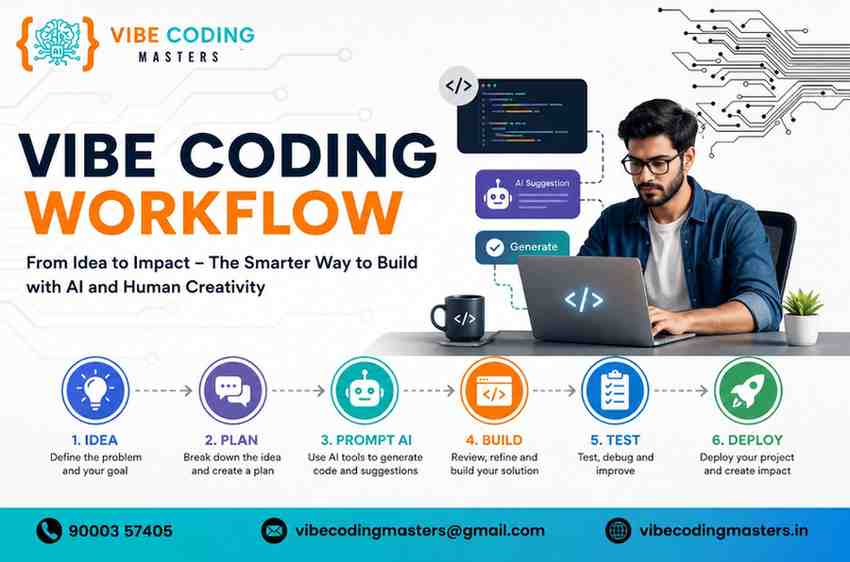
The core loop looks like this
- Describe your software idea using clear, natural language.
- The AI tool generates or edits code.
- You review the output, run it, and test the behavior.
- You refine the prompt or fix the code directly, and repeat.
It’s called “vibe” coding because the process feels less like writing syntax and more like collaborating with a very fast, occasionally overconfident junior developer — you’re steering by feel and intent rather than typing every character. If you’re new to the term, here’s a more detailed breakdown of what vibe coding actually means.
How Vibe Coding Workflow Works
At a technical level, a Vibe Coding Workflow depends on large language models (LLMs) trained on massive amounts of code and documentation. When you describe a task, the model doesn’t just pattern-match snippets — modern coding agents can read your existing files, understand your project’s structure, plan a sequence of edits, execute commands in a terminal, and check whether the result actually runs.
A typical AI-powered coding session moves through these phases
- Context gathering — the AI reads relevant files, dependencies, and past commits so its suggestions fit your existing codebase instead of ignoring it.
- Planning — for larger tasks, the assistant breaks the request into smaller steps (create a database model, then an API route, then a UI component).
- Generation — the AI writes or edits the actual code.
- Execution and testing — many modern tools can run the code, execute tests, and read error messages automatically.
- Iteration — if something fails, the AI (or you) adjusts the prompt or the code and tries again.
The workflow becomes more powerful the more the tool understands about your intent — clear prompts, good project structure, and existing tests all make the AI’s output more reliable.
Why Vibe Coding Workflow is Changing Software Development
Three forces are pushing vibe coding from a novelty into a default practice.
Speed. Tasks that used to take hours of boilerplate writing — setting up a CRUD API, wiring a form, writing test scaffolding — can now be generated in minutes, leaving more time for design decisions and edge cases.
Accessibility. People who understand a problem deeply — founders, product managers, designers — but never learned to code can now build working prototypes themselves. Reports on AI app-building platforms have found that a large majority of users on some tools have no formal engineering background.
Economics. The cost of building a basic product has dropped sharply for early-stage teams, since a single person with a good workflow can now do work that once required a small team.
That said, the shift isn’t without friction. Multiple 2026 industry analyses have flagged rising code-quality and security concerns tied to unreviewed AI output, which is why the workflow — not just the tool — matters so much. A good Vibe Coding Workflow always keeps a human reviewing, testing, and understanding the code, rather than blindly shipping whatever the AI produces.
Benefits of Using a Vibe Coding Workflow
- Faster prototyping — go from idea to working demo in hours instead of weeks.
- Lower barrier to entry — non-engineers can build and validate ideas without hiring a developer first.
- Reduced boilerplate fatigue — repetitive setup work (routes, forms, config files) gets automated.
- More time for architecture and design — developers spend more energy on decisions that need human judgment.
- Faster learning curve — beginners can see working examples immediately and learn by reading AI-generated code rather than starting from a blank file.
- Easier experimentation — testing multiple approaches to a feature becomes cheap, since generating a new version takes minutes.
Essential Steps in a Modern Vibe Coding Workflow
- Define the problem clearly. Write down what the feature or app needs to do before opening any tool. Vague prompts produce vague code.
- Choose the right AI tool for the job — a full IDE like Cursor for a complex app, or a quick chat-based assistant for a single function.
- Set up the project scaffold (framework, folder structure, dependencies) so the AI has context to work within.
- Prompt in small, specific steps rather than asking for an entire app in one shot — this keeps output reviewable.
- Review every generated change before accepting it, checking logic, security, and style.
- Test continuously, ideally with the AI writing test cases alongside the feature code.
- Debug collaboratively — paste error messages back to the AI, but verify its diagnosis before applying a fix.
- Refactor for clarity once the feature works, since AI-generated code can be verbose or inconsistent.
- Deploy and monitor, using AI to help configure deployment scripts but keeping a human in charge of production changes.
- Document what was built, since AI-heavy codebases can become hard to maintain without clear notes on intent.
If you’d rather learn this entire loop under guided instruction instead of piecing it together alone, our Full Stack with Vibe Coding course walks through it step by step with real projects.
AI Tools Used in Vibe Coding Workflow
Cursor AI is a code editor built on top of VS Code with deep AI integration for multi-file edits, chat-based coding, and agentic task execution across a whole project. You can explore it directly at cursor.com.
GitHub Copilot is Microsoft’s AI pair programmer, offering inline code suggestions and, increasingly, agent-style task completion inside IDEs like VS Code and JetBrains. Full details are available on the official GitHub Copilot page.
ChatGPT is OpenAI’s general-purpose assistant, widely used for explaining code, drafting functions, debugging, and reasoning through architecture decisions in a conversational format.
Claude AI (from Anthropic) is a large language model known for strong reasoning and long-context understanding, often used for reviewing large codebases, writing documentation, and working through complex multi-step coding tasks; it’s also available as an agentic coding tool called Claude Code. Learn more at anthropic.com/claude.
Gemini AI is Google’s model family, integrated into tools like Android Studio and various IDE extensions for code generation and review.
Windsurf is an agentic IDE (formerly known as Codeium) built around an autonomous coding agent that can read a codebase, make multi-file changes, and run commands with minimal hand-holding.
VS Code is the open-source code editor that many of these AI tools are built on top of or plug into, thanks to its large extension ecosystem.
Git & GitHub provide version control and collaboration — essential for tracking what AI changed, reverting mistakes, and working in teams. Git itself is documented at git-scm.com.
React is a popular JavaScript library for building user interfaces, frequently the target framework when AI tools generate frontend code.
Next.js is a React framework that adds routing, server-side rendering, and deployment conventions, and is a common default for AI-generated full-stack apps.
Node.js is a JavaScript runtime that lets AI-generated backend code run outside the browser, commonly used for APIs and servers. Official documentation is at nodejs.org.
Python is a widely used language for backend logic, data processing, and AI/ML work, and one of the languages AI models tend to generate especially reliably. If you want to specialize here, consider a structured Python with Vibe Coding path.
Java remains a core language for enterprise backend systems, and many Hyderabad-based IT employers still expect it alongside newer AI-assisted tooling — a Java with Vibe Coding course is a practical way to combine both.
APIs are the interfaces that let different pieces of software communicate — a huge share of vibe-coded projects involve wiring together or building APIs.
Databases (like PostgreSQL, MySQL, or MongoDB) store an application’s data; AI tools can help design schemas and write queries, though schema decisions still benefit from human review.
Docker packages an application with everything it needs to run consistently across environments, and AI tools increasingly help generate Dockerfiles and configuration. Official resources are at docker.com.
Vercel is a deployment platform popular for frontend and full-stack apps, especially those built with Next.js.
Netlify is another deployment platform focused on fast, simple hosting for web apps and static sites, often paired with AI-generated frontend projects.
Roles and Responsibilities in Vibe Coding App Development
Take a vibe coding role tomorrow and this is roughly your week.
- Prompt engineering — writing specifications precise enough to get usable output in one or two attempts.
- AI-assisted coding — directing generation and stitching the pieces into a coherent codebase.
- Debugging AI-generated code — the single most underestimated responsibility in the role.
- UI development — building interfaces in a framework such as React, then refining states and accessibility by hand.
- Backend integration — wiring APIs, authentication and data layers together correctly.
- API development — designing endpoints, contracts and error handling other teams can rely on.
- Testing — writing and reviewing tests, especially for code you did not personally type.
- Deployment — shipping to cloud infrastructure with sane environments and rollback paths.
- Performance optimisation — profiling and fixing the inefficient patterns AI models reach for by default.
- Security implementation — input validation, secrets handling and dependency hygiene, which AI rarely gets right unprompted.
Frontend Development Workflow with AI
Frontend work is one of the fastest areas to vibe-code because UI components follow recognizable patterns. A typical flow: describe the screen or component you want, let the AI generate a React or Next.js component, preview it visually, then iterate on styling and behavior through follow-up prompts. Tools like Cursor and Windsurf can see your existing design system and match it automatically, while chat-based tools like ChatGPT or Claude are useful for one-off components or explaining unfamiliar CSS behavior. The key discipline is checking responsiveness, accessibility, and edge cases (empty states, loading states, errors) — these are the details AI tools most often skip unless explicitly asked. To build this skill set properly, take a look at our dedicated Frontend Vibe Coding course.
Backend Development Workflow with AI
Backend work benefits from AI in a different way — less visual iteration, more logic and data-flow correctness. A common pattern: describe the API endpoint or business logic you need, let the AI draft the route, database query, and validation, then manually verify edge cases like authentication, error handling, and data integrity. Because backend mistakes are often invisible until production, this is an area where careful review matters more than raw generation speed. Tools like Claude and GitHub Copilot are commonly used here for their ability to reason about multi-step logic and existing code context. If backend work interests you as a specialization, explore our Backend Vibe Coding course.
Testing and Debugging in a Vibe Coding Workflow
AI can write tests as readily as it writes features, and asking for tests alongside every function is one of the highest-leverage habits in a Vibe Coding Workflow. When something breaks, pasting the exact error message and relevant code back to the assistant often produces a usable fix — but the fix should always be understood, not just applied. Several 2026 industry audits have found that AI-generated code carries a meaningfully higher rate of security and logic issues than human-written code when it isn’t reviewed carefully, which makes testing and debugging discipline the difference between a fast workflow and a fragile one.
Deploying Applications Using a Vibe Coding Workflow
Once a feature works locally, AI tools can help generate deployment configuration — a Dockerfile, a CI/CD pipeline, or platform-specific settings for Vercel or Netlify. The human’s job at this stage is to confirm environment variables, secrets, and production settings are correct, since a mistake here has real consequences. Many teams treat deployment as the one stage where AI suggestions get the heaviest manual scrutiny before anything goes live.
Best Practices for an Efficient Vibe Coding Workflow
These habits are also the backbone of our full course syllabus, which walks through each one in a structured, project-based order.
- Write specific, structured prompts instead of vague requests.
- Keep changes small and reviewable rather than generating huge diffs at once.
- Always read the code before running it, especially anything touching data or authentication.
- Maintain version control so every AI-generated change is easy to revert.
- Ask the AI to explain its own code if something looks unfamiliar.
- Pair AI-generated code with automated tests before merging.
- Periodically refactor to keep the codebase consistent, since AI output style can vary between sessions.
Common Mistakes to Avoid
- Accepting AI-generated code without reading or testing it.
- Writing vague, one-line prompts for complex features and expecting reliable results.
- Skipping security review, especially around authentication, input validation, and secrets.
- Letting a single AI session sprawl across too many unrelated changes at once.
- Treating AI output as final rather than a strong first draft.
- Ignoring documentation, which makes AI-heavy codebases hard for humans to maintain later.
Vibe Coding Workflow for Beginners
If you’re new to coding, the temptation is to ask an AI tool to “build me an app” and hope for the best. Before diving in, it’s worth checking the eligibility requirements before you start so you know what background (if any) is expected. A better starting approach
- Learn the absolute basics of one language (Python or JavaScript) so you can read what the AI produces.
- Start with small, single-purpose scripts before attempting a full application.
- Use a beginner-friendly tool with a visual preview, so you can see results immediately.
- Ask the AI to explain each piece of code it generates — this builds real understanding over time.
- Gradually take on more manual editing as your comfort grows.
The goal isn’t to avoid learning to code — it’s to learn faster by reading and adjusting real, working examples instead of starting from a blank page.
Career Opportunities with Vibe Coding Skills
Vibe coding is creating demand for hybrid skill sets rather than replacing developers outright, and it’s worth understanding what these roles typically pay before choosing a specialization. In IT hubs like Hyderabad, employers are increasingly listing AI-assisted development as a preferred skill rather than a nice-to-have. Roles growing around this shift include
- AI-assisted full-stack developers who can direct AI tools efficiently while still owning architecture and code quality.
- Prompt engineers and AI workflow designers who specialize in getting reliable output from coding assistants.
- QA and security reviewers focused specifically on auditing AI-generated code.
- No-code/low-code product builders — founders and product people using AI tools to ship without a traditional engineering background.
- AI tooling and DevOps engineers who build the pipelines and guardrails that keep AI-generated code safe in production.
Experienced engineers who can effectively filter and correct AI output tend to see the largest productivity gains, while less experienced developers benefit most from using AI as a learning tool rather than a shortcut around fundamentals. For a fuller picture, see the full range of careers open to you after vibe coding.
Future of Vibe Coding Workflow
Expect three trends to keep shaping this space through the rest of the decade
- Deeper agentic capability — tools that can handle longer, multi-step tasks with less supervision, while still flagging decisions that need human sign-off.
- Stronger governance and review tooling — as more production code becomes AI-generated, expect more built-in security scanning, testing, and audit trails specifically for AI output.
- Consolidation among tool providers — several major AI coding platforms have changed ownership or shut down variants in 2026 alone, a sign that the tool landscape will keep shifting even as the underlying workflow stabilizes.
The practice of vibe coding itself looks likely to stay — what will keep evolving is how much autonomy teams give the AI, and how much structure they build around reviewing what it produces.
Why Vibe Coding Workflow is the Future of Software Development
Organizations, startups, freelancers, and individual developers are converging on AI-assisted workflows for a simple reason: the return on investment is hard to ignore.
Startups have shipped functional products with a fraction of the team size and budget that similar projects required a few years ago. Enterprises are integrating AI coding assistants into standard developer tooling rather than treating them as experiments. Freelancers and solo builders are taking on projects that would once have required a small team.
At the same time, the organizations getting the best results share a common trait: they don’t treat AI as a replacement for engineering judgment. They treat it as a force multiplier wrapped in a disciplined workflow — clear specifications, continuous testing, and human review at the points that matter most. That combination, more than any single tool, is what “Vibe Coding Workflow” really describes.
AI Tools Comparison Table
Tool | Primary Use | Best For | Advantages | Limitations |
Cursor AI | AI-native code editor | Full-project, multi-file development | Deep codebase context, agentic multi-step edits | Paid tiers needed for heavy use; ownership/direction has shifted amid industry consolidation |
GitHub Copilot | Inline code completion + agent tasks | Developers already in VS Code/JetBrains | Tight IDE integration, strong for boilerplate | Less autonomous on complex, multi-file tasks than dedicated agentic IDEs |
ChatGPT | Conversational coding assistant | Explaining, drafting, debugging code | Flexible, great for reasoning and learning | No native codebase awareness without added tooling |
Claude AI | Reasoning-focused assistant / agentic coding | Complex logic, large codebases, documentation | Strong long-context understanding, careful reasoning | Requires clear prompts for best multi-step results |
Gemini | Google’s AI model family | IDE integrations, Android development | Tight Google ecosystem integration | Feature availability has shifted with recent product changes |
Windsurf | Agentic IDE | Fast multi-file agent-driven changes | Automatic context retrieval, responsive completions | Ownership changes have introduced some roadmap uncertainty |
Vibe Coding Workflow Roadmap Table
Stage | Skills to Learn | Recommended AI Tools | Projects | Expected Outcomes |
Beginner | Basic syntax in one language, reading AI-generated code | ChatGPT, Claude, beginner-friendly IDE assistants | To-do list app, simple calculator | Comfort reading and lightly editing AI output |
Intermediate | Debugging, git basics, API concepts | Cursor, GitHub Copilot | Personal blog with a database, weather app using an API | Ability to build small full-stack projects with AI support |
Advanced | Testing, authentication, deployment | Cursor, Windsurf, Claude | SaaS MVP, multi-user app with login | Shipping a working product with proper review practices |
Professional | Architecture, security review, team workflows | Full stack of tools above, tailored to team needs | Production systems, internal tools at scale | Leading AI-assisted teams while maintaining code quality and security |
Traditional Coding vs Vibe Coding Workflow Comparison
Factor | Traditional Coding | Vibe Coding Workflow |
Development Speed | Slower, manual typing of most logic | Significantly faster for boilerplate and prototypes |
Learning Curve | Steep at the start, deep fundamentals required | Gentler entry, but risks shallow understanding without discipline |
Productivity | Steady, scales with experience | Can be very high, but uneven — depends on review habits |
Code Quality | Consistent if the developer is skilled | Variable; needs active review to avoid hidden issues |
Collaboration | Well-established norms and tools | Still maturing; teams are building new review practices |
Maintenance | Predictable, since a human wrote every line intentionally | Can be harder if AI-generated code isn’t well understood or documented |
Best Use Cases | Complex, safety-critical, or highly specialized systems | Prototypes, MVPs, boilerplate-heavy features, internal tools |
Key Takeaways
- A Vibe Coding Workflow pairs AI-generated code with human direction, review, and testing — it’s a process, not just a tool.
- Speed and accessibility are the biggest draws, letting both beginners and experienced developers build faster.
- Review discipline is non-negotiable — unreviewed AI code carries measurably higher quality and security risks.
- The best results come from clear, specific prompts and small, reviewable steps rather than one giant AI-generated dump of code.
- The tool landscape is changing fast, so building strong workflow habits matters more long-term than mastering any single product.
Conclusion
The Vibe Coding Workflow isn’t a passing trend — it’s a genuine shift in how software gets built, and it’s moving fast enough that sitting on the sidelines has a real cost. Whether you’re a complete beginner with an idea for an app or a senior engineer looking to ship faster without sacrificing quality, the path forward is the same: learn the fundamentals, pick tools that fit your project, and build a disciplined loop of prompting, reviewing, and testing. Start small, stay curious about how the generated code actually works, and keep refining your process — that’s how you turn a Vibe Coding Workflow from a buzzword into a real competitive edge in 2026’s AI-driven development landscape. If you’d rather learn this hands-on with mentor support instead of figuring it all out solo, the Vibe Coding Course in Hyderabad covers this entire workflow through real projects, and you can book a free demo with Vibe Coding Masters to get started this week.
FAQ
- What is a Vibe Coding Workflow in simple terms?
It’s a way of building software where you describe what you want in plain language, an AI tool generates the code, and you review, test, and refine the result instead of writing every line manually.
- Is vibe coding the same as no-code development?
Not quite. No-code tools use visual builders with no code involved, while vibe coding still produces real code — it’s just generated through natural-language prompts instead of manual typing.
- Do I need to know how to code to use a Vibe Coding Workflow?
No, but it helps significantly. Understanding basic programming concepts lets you catch mistakes, write better prompts, and avoid blindly trusting AI output.
- Which AI tool is best for vibe coding beginners?
Chat-based tools like ChatGPT or Claude are often easiest to start with since they explain their reasoning, while dedicated editors like Cursor or Windsurf suit people ready to work inside a full project.
- Is AI-generated code safe to use in production?
Only with review. Industry audits in 2026 have repeatedly found higher rates of security and logic issues in unreviewed AI-generated code, so testing and human oversight remain essential.
- How is vibe coding different from AI-assisted coding?
AI-assisted coding usually means autocomplete-style suggestions while a developer writes most of the logic; vibe coding shifts the AI into producing much larger portions of the code, with the human focused on direction and review.
- Can vibe coding replace software developers?
Most evidence points toward augmentation rather than replacement — the developer’s role shifts toward specification, review, and architecture rather than disappearing.
- What industries are adopting Vibe Coding Workflows fastest?
Startups and product teams building prototypes and MVPs have adopted it fastest, with larger enterprises following more cautiously due to security and governance concerns.
- What skills should I learn to get a job related to vibe coding?
Programming fundamentals, prompt engineering, testing and debugging practices, and enough security awareness to review AI-generated code responsibly. Backing these skills with a recognized certification can also help when applying for roles.
- Will Vibe Coding Workflows keep changing?
Yes — the underlying practice looks stable, but the specific tools are shifting quickly, with several major platforms changing ownership or capabilities throughout 2026 alone.